Use case
Data videos: numbers that count up and bars that grow
A number on a slide is forgettable. The same number counting up while a voice says why it matters is a video people share.
Write the numbers into the script as you'd say them, and our AI turns them into graphics: a figure counts up, a run of named numbers becomes a bar chart, a share becomes a progress ring. The gallery's "If the world were 100 people" is 31 seconds of exactly that, narrated over pictures of the people behind each number.
The example, and the script it came from
- Landscape 16:9
- 31 s
- Voice: Insightful Speaker
- Captions: clean
This is the whole script that went in. Everything else (the narration, the pictures, the graphics and the captions) our AI made from it.
If the world were a village of 100 people, here's who would live there. 59 would come from Asia, 18 from Africa, 9 from Europe, 8 from Latin America, and 5 from North America. 26 would be children under fifteen. About 67 would own a mobile phone, and 64 would be online. And every year, the village would welcome one new neighbor. One village, a hundred people, and a lot in common.
The example: if the world were 100 people
A landscape data story narrated by MiniMax's Insightful Speaker with clean captions. Its numbers: "59 would come from Asia, 18 from Africa, 9 from Europe, 8 from Latin America, and 5 from North America. 26 would be children under fifteen. About 67 would own a mobile phone, and 64 would be online."
Each figure is a graphic, and between them the pictures keep the people in view.
How numbers become graphics
Our AI writes the chart's data from your sentence; open the scene to correct a value and render it again.
| In the script | On screen |
|---|---|
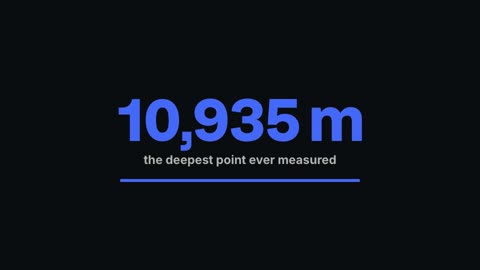
| One figure: "about 17% water" | A count-up stat |
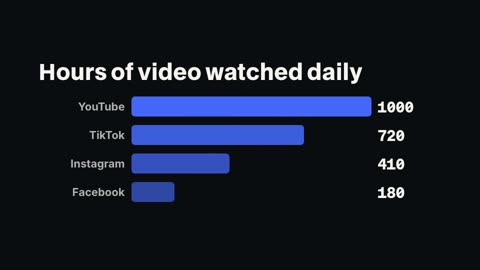
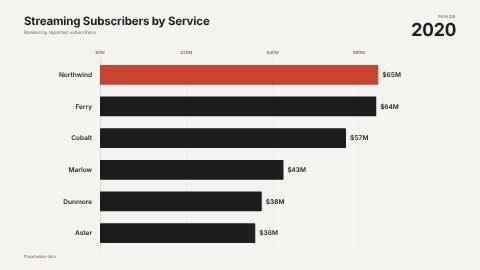
| Named numbers: "Finland about 12 kilos, Norway 9.9, Iceland 9" | A bar chart, one bar per name |
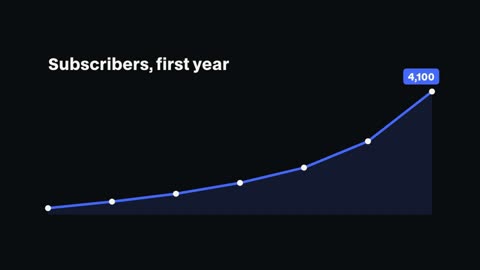
| A change over time | A line graph |
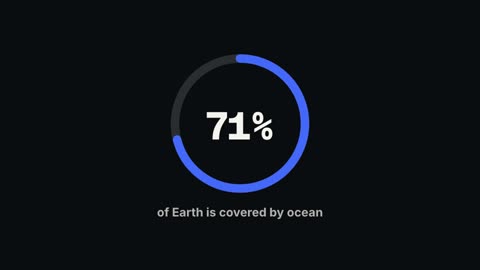
| A share of a whole: "67 of 100" | A progress ring |
| Two values side by side | A comparison |
The coffee chart
The gallery's coffee video asks "Who drinks the most coffee?" and answers with four countries per person each year: Finland about 12 kilos, Norway 9.9, Iceland 9, Denmark 8.7. Those four values became the chart; the last line, "The coldest, darkest winters brew the strongest habit," is the point the chart makes.
Chart templates
Our bar chart, line graph, count-up, progress ring and comparison take your labels and numbers. The library adds HyperFrames' bar chart race and its US and world maps for numbers by place.
Getting the numbers right
- Put numbers in digits and units in words: "12 kilos", "90%"
- Keep a chart to six bars or fewer so every label reads on a phone
- Say where the figure is from in the script if it matters to your audience
- Check every value in the scene editor before you render the final video
Questions
Do I need a spreadsheet?
No. Write the numbers in the script as sentences and our AI builds the chart. You can edit the values afterwards.
Which charts are there?
Bar chart, line graph, count-up stat, progress ring and comparison, plus a bar chart race and maps from the HyperFrames library.
Can I change a number after the video is made?
Yes. Open the scene, change the value and render again; only that scene is made again.
Can I add a chart to my own footage?
Yes. In the editor, add a chart template at the playhead, or ask the chat to add one with your numbers.
Which plans include it?
Every paid plan: Pro $20 a month, Studio $50, Max $100.
Keep reading
- Charts and countersNumber counters that count up, bar chart races, line graphs, progress rings and comparisons. Type the numbers and drop the chart into your video.
- Finance explainersExplain a money idea in under a minute: the rule, the example worked out on screen, and a calm voice. Count-ups, comparisons and charts from your numbers.
- Explainer videosExplain how something works in a minute: a picture for each step, chapter cards, numbers on screen and a calm narrator. Vertical or landscape.
- Animated mapsAnimated world, US and Spain maps, bubble and flow maps, and a flight route between two cities, ready to add to history, travel and data videos.
- Real estate videosMake a listing video in minutes: the address, each room with its best detail, the price and contact on screen, narrated. Use your listing photos or footage.
- Podcast clipsCut the best minute of an episode into a vertical clip: the dead air removed, captions word by word, the guest's name in a lower third, ready to post.
Updated 29 October 2026
Make your next video
Upload a video or paste a script, then say the edit. Our AI makes it on a timeline you can still change.
Try for free