Use case
Turn podcast moments into captioned clips
An hour-long episode has a few minutes people would share. Find them, tighten them, caption them, and they become the episode's best ads.
Upload the episode or the part you want, and ask the chat for the clip: it cuts to the moment, removes the pauses between answers, adds captions timed to each word, puts the speaker's name and role in a lower third and makes a vertical copy for Shorts, Reels and TikTok. Or, for a quote-style clip with no footage, paste the lines and our AI makes it.
The example, and the script it came from
- Vertical 9:16
- 13 s
- Voice: Chris
- Captions: pop
This is the whole script that went in. Everything else (the narration, the pictures, the graphics and the captions) our AI made from it.
The best advice I ever got was simple. Make the thing you wish existed. Then tell the ten people who'd want it. Not ten thousand. Ten. They'll tell the rest.
The example: the best advice I ever got
This clip is 13 seconds, vertical, narrated by Chris with pop captions, made from a script: "The best advice I ever got was simple. Make the thing you wish existed. Then tell the ten people who'd want it. Not ten thousand. Ten. They'll tell the rest."
That's the shape of a good podcast clip: one idea, a turn in the middle, and a line that lands at the end.
Clipping real episode footage
The chat reads the transcript, so you can point at a moment by what was said instead of scrubbing for it.
- Cut to 23:14-24:02 (48 s)
- Cut 14 pauses between sentences
- Added captions with word timing
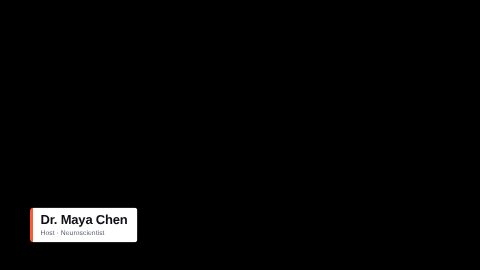
- Added a lower third: "Maya Chen, Founder"
Overlays podcasts use
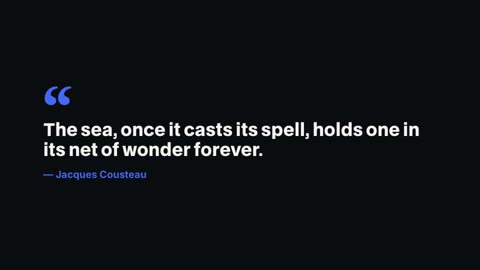
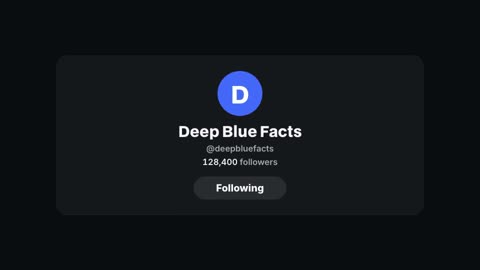
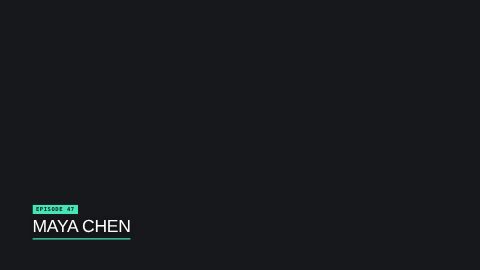
A lower third with the guest's name and role, a callout for a key number, a quote card for the line you want shared, a follow card at the end. The library also has HyperFrames' podcast and interview overlays.


Making it work on a phone
- Vertical 9:16: ask for a 9:16 copy of a landscape recording and the frame is re-centred
- Captions large and high enough to clear the app's buttons
- Under 60 seconds for most clips; the moment, not the whole answer
- A hook on screen for the first second, written by our AI from what's said
One episode, several clips
Make each clip its own project from the same recording, ask for a different moment each time, and keep the same caption style and lower third so the clips read as one show.

- 1Chat edits
- 2Timeline
- 3Graphics library
- 4Captions
Questions
Can I upload a whole episode?
Yes. Upload the recording, then point the chat at the moment by what was said, or trim it on the timeline.
Can it make a vertical clip from a landscape recording?
Yes. Ask for a 9:16 copy and our AI re-frames it, with the captions and lower third moved into the vertical frame.
Does it add the speaker's name?
Ask for a lower third with the name and role, or pick one from the templates and type them in.
How long should a podcast clip be?
Most work at 20 to 60 seconds: one idea, with the setup and the payoff.
Which plans include it?
Every paid plan: Pro $20 a month, Studio $50, Max $100.
Keep reading
- Lower thirds15 animated lower third templates for interviews, podcasts and explainers. Type the name and role, pick your colour, and render it over your video.
- Text animationsAnimated titles, kinetic words, typewriter text, handwritten titles and chapter cards. Type your words and render them into your video.
- Silence removerCut every pause, um and retake from a talking video in one go. Our AI finds the dead air from the words and the sound, and you can still change every cut.
- Animated captionsAdd captions timed to each word: karaoke fills, one big word at a time, a highlighted spoken word or a tag. Restyle them all at once or by chat.
- Data videosTurn statistics into a video: counting numbers, bar charts built from your figures, a line graph for the trend and a narrator who makes the point.
- Explainer videosExplain how something works in a minute: a picture for each step, chapter cards, numbers on screen and a calm narrator. Vertical or landscape.
Updated 29 October 2026
Make your next video
Upload a video or paste a script, then say the edit. Our AI makes it on a timeline you can still change.
Try for free