- Editor
- Comparisons
- A Kapwing alternative for faceless and talking videos
Comparison
A Kapwing alternative for faceless and talking videos
Kapwing and UGCLive Editor both run in a browser. The difference is who does the editing, and what you start from.
Kapwing is a strong choice for teams who edit by hand and want 4K, long exports and shared workspaces. UGCLive Editor suits solo creators who want our AI to do the first cut from a chat message, or to turn a script into a finished narrated video.
Side by side
Facts read on Kapwing's own pages on 2026-10-29. Plans and prices change; check them before you buy.
| Kapwing | UGCLive Editor | |
|---|---|---|
| Free plan | Yes: 720p, Kapwing watermark, exports up to 4 minutes, 30 minutes a month | No free plan |
| Paid plans | Pro $16 a month, Business $50 a month (monthly prices; yearly saves 33%) | Pro $20, Studio $50, Max $100 a month; yearly 30% off |
| Export | 4K on paid plans, up to 120 minutes long | 1080p, up to 15 minutes for a script video |
| AI subtitles | Up to 1,000 minutes a month on Pro, 4,000 on Business | Word-timed captions in five styles: Highlight, Karaoke, One word, Tag and Plain |
| Pauses | Smart Cut removes silences | Ask in chat, or run AI edit: pauses, fillers and retakes, with a cutting strength you set |
| Text to speech | Up to 50 minutes a month on Pro | 130 voices for narration and voiceovers |
| From a script | A script generator and an AI video generator are listed; not tied to a plan on the pricing page | Paste a script: scenes, narration, a picture per sentence, graphics and captions |
| How AI edits arrive | Each tool is run on its own | One chat request does several edits; one Undo reverses them all |
| Graphics | Text, overlays and templates | 156 editable motion graphics (19 ours, 137 HyperFrames) |
| Storage | 200 GB on Pro, 800 GB on Business | Projects and exports kept in your account |
Stay with Kapwing, or switch?
Stay with Kapwing if
- You want to try for free: Kapwing's free plan exports at 720p with a watermark, and UGCLive Editor has no free plan.
- You need 4K or exports longer than 15 minutes.
- Your team shares a workspace with lots of storage (800 GB on Business).
Switch to UGCLive Editor if
- You make faceless videos and want the narration and pictures made for you.
- You'd rather describe the edit once than run five tools in a row.
- You want charts, maps and lower thirds that take your words and the video's colours.
One message instead of five tools
A typical talking-head cleanup in Kapwing is a chain: Smart Cut for the silences, subtitles, a resize for vertical, then text on top. Each step is its own tool.
In UGCLive Editor that's one message. Our AI makes every change, lists them, and marks them on the timeline so you can check each one.
- Removed 12 pauses and 3 filler words
- Added highlight captions
- Added a hook: "Nobody tells you this about sleep"
Script to video, start to finish
Kapwing's pricing page lists an AI video generator but doesn't say which plan includes it. In UGCLive Editor, script to video is the main way in: paste up to 30,000 characters, pick Shorts or YouTube and a voice, and our AI makes it.
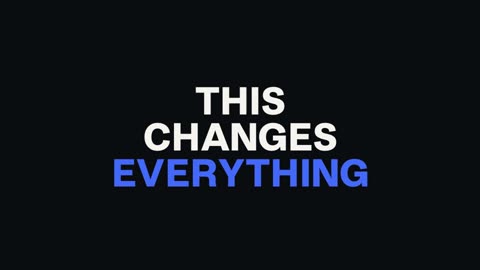
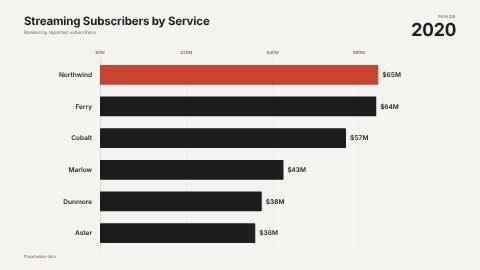
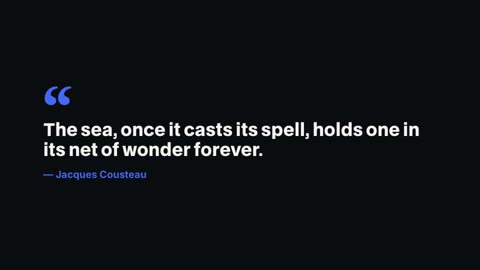
Graphics appear by themselves where they fit: a quote becomes a quote card, a run of numbers becomes a chart, "Chapter two" becomes a chapter card.
- 1
Paste the script
Up to 15 minutes of video
- 2
Pick a format and voice
1080×1920 or 1920×1080, 130 voices
- 3
Edit what you want
By chat, by scene, or on the timeline
Made this way
Each of these began as a few sentences pasted into the box.
The graphics library
Our Graphics panel holds full HyperFrames compositions as well as our own blocks. You change the words, length and look, and the panel renders it for your video.

Sources
Questions
Is Kapwing free?
Kapwing has a free plan with 720p exports, a watermark, a 4-minute export length and 30 export minutes a month, per its pricing page on 2026-10-29. Pro is $16 a month and removes the watermark.
Does UGCLive Editor have a free plan?
No. Plans are Pro $20, Studio $50 and Max $100 a month, 30% off yearly. Every tool is on every plan; bigger plans make more minutes.
Can UGCLive Editor remove silences like Kapwing's Smart Cut?
Yes. Ask in chat ("cut the long pauses") or run AI edit, which also removes filler words and retakes. A slider sets how hard it cuts, and the cuts are normal edits you can trim back.
Which is better for long videos?
Kapwing exports up to 120 minutes on paid plans. UGCLive Editor's script videos run up to 15 minutes, which fits most YouTube explainers but not long podcasts.
Keep reading
- Clipchamp vs UGCLive EditorClipchamp is a free browser editor you drive by hand. UGCLive Editor turns a script into a finished video and makes edits you type in chat. Side by side.
- Descript vs CapCutDescript edits video by editing its transcript; CapCut is a timeline editor with templates and effects. Prices, AI tools and who each suits, read 2026-10-29.
- Silence removerCut every pause, um and retake from a talking video in one go. Our AI finds the dead air from the words and the sound, and you can still change every cut.
- AI video editors comparedEight AI video editors side by side: what each one is best at, who it suits and what its own pricing page says, checked October 29, 2026.
- InVideo vs UGCLive EditorInVideo AI turns prompts into storyboards with stock footage and AI models. UGCLive Editor makes a picture for every line and keeps it on a timeline you edit.
Updated 29 October 2026
Make your next video
Upload a video or paste a script, then say the edit. Our AI makes it on a timeline you can still change.
Try for free